Lightfielder | Uninstalling Lightfielder
Listed below are the steps for removing Lightfielder from your computer.
Removing the Custom PathMaps
Resolve uses the term PathMaps to represent the installation location used for resources like Lua/Python scripts, effects templates, macros, and fuses. The basic process for removing a custom "Lightfielder:" PathMap entry in Resolve's PathMap Preferences involves:
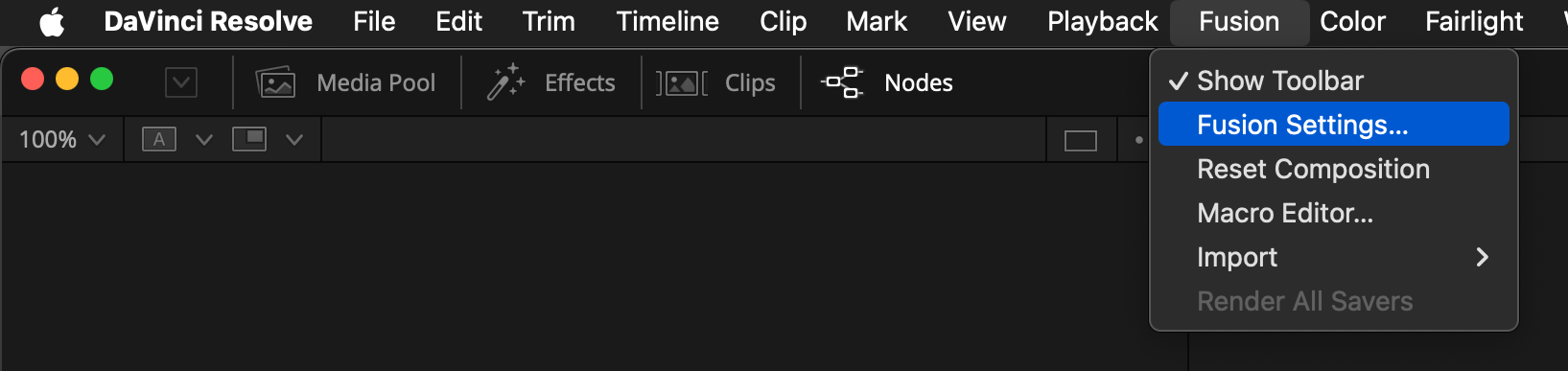
- Switch to the Fusion page and then open the "Fusion > Fusion Settings…" menu.
- Navigate to the "PathMap" section on the left side of the settings dialog:
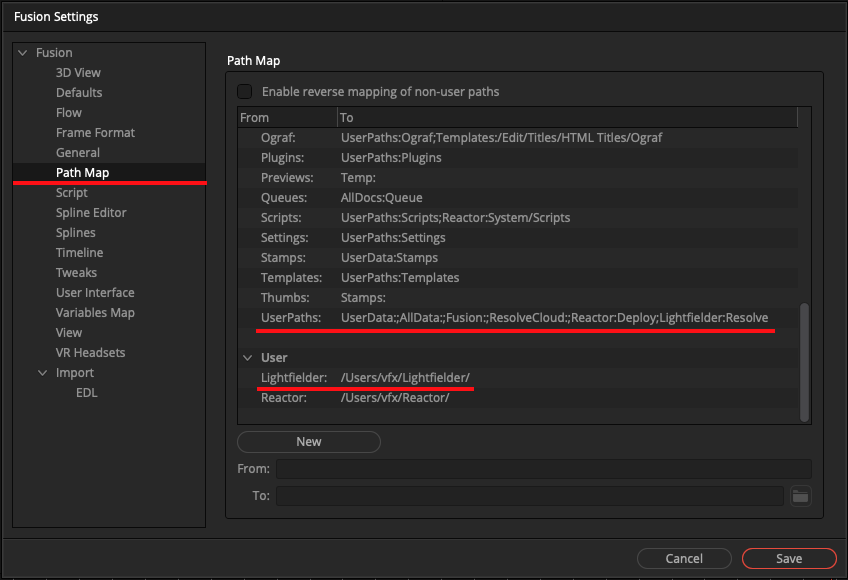
User:
The User PathMap setting for "Lightfielder" lets Resolve know where the files are installed on your hard disk. This makes Lightfielder portable so it can be installed in a cross-platform compatible way.
Click on the Lightfielder PathMap entry, then press the "Delete" button:
From: Lightfielder:
Defaults:
The "UserPath" PathMap setting tells Resolve that the Lightfielder folder has Python scripts that should be loaded into the Resolve "Workspace" menu.
To clean up the older Lightfielder UserPath entry, remove the ";Lightfielder:Resolve" text in the field so it only contains the following characters:
From: UserPaths:
To: UserData:;AllData:;Fusion:;ResolveCloud:
From: UserPaths:
To: UserData:;AllData:;Fusion:;ResolveCloud:
Note: On a Resolve Studio on Linux system there is a chance the ";ResolveCloud:" element does not exist in this text field.
From: UserPaths:
To: UserData:;AllData:;Fusion:;ResolveCloud:
Remove the Lightfielder Preferences
Using the Resolve Console window you can remove all of the Lightfielder preferences that are stored in the "Profiles:/Defaults/Fusion.prefs" PathMap based file.
print("[Preferences] Resetting to the default values")
app.SetData("Lightfielder", None)
app.SavePrefs()
Remove the Lightfielder Folder
At this point we are ready to remove the Lightfielder folder from your hard disk to complete the Lightfielder toolset's uninstall process.
-
Quit Resolve Studio.
-
Navigate to your home folder in a desktop folder browsing window.
-
You can (optionally) zip compress a copy of the current Lightfielder folder to save a back up version of the files as they exist at this moment. This might be a useful step.
-
To permanently remove the Lightfielder folder, drag the "Lightfielder" folder directly to your trash can to delete the files.