vArrayDisplaceValues
Apply noise-driven displacement to 3D point arrays with Cinema 4D-style spherical falloff — organic scatter, turbulence, and localised distortion in a single node.
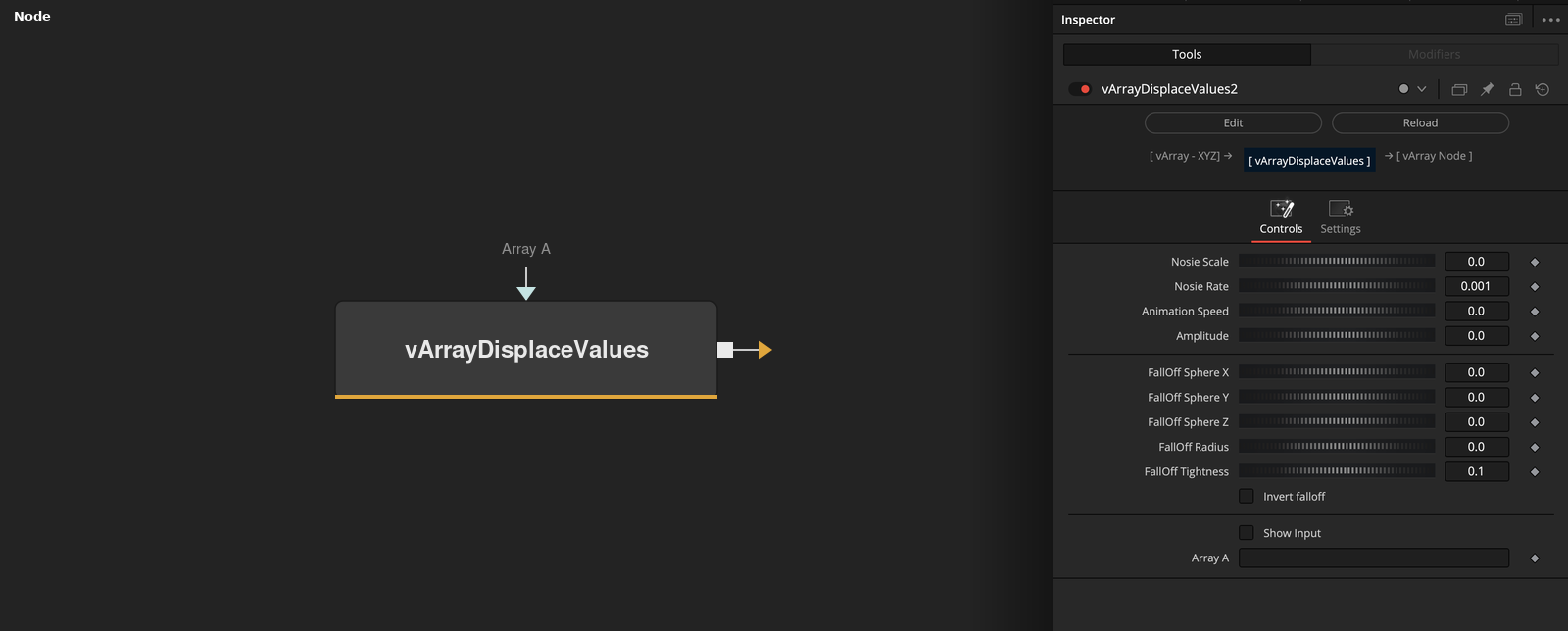
vArrayDisplaceValues perturbs the XYZ positions in a vArray point table using procedural noise, with an optional spherical falloff that limits the effect to a defined region of space. Place it between any point generator and vArrayCameraProjection to break up the regularity of grid, circle, or arc layouts without manual keyframing.
Parameters
| Parameter | Type | Default | Description |
|---|---|---|---|
| Noise Scale | Float | 0 | Spatial frequency of the noise field. Higher values zoom in on the noise pattern, producing tighter variation between adjacent points; lower values produce broad, sweeping displacement. Note: labelled ‘Nosie Scale’ in the UI (known typo in the fuse). |
| Noise Rate | Float | 0.001 | Temporal offset into the noise field. Animate this (or connect to a frame expression) to drive continuous noise evolution over time. Note: labelled ‘Nosie Rate’ in the UI (known typo in the fuse). |
| Amplitude | Float | 0 | Maximum displacement distance in world-space units. Scales how far each point is pushed from its original position by the noise field. |
| FallOff Sphere X | Float | 0 | X position of the spherical falloff zone centre in world space. |
| FallOff Sphere Y | Float | 0 | Y position of the spherical falloff zone centre in world space. |
+6 more parameters
| Parameter | Type | Default | Description |
|---|---|---|---|
| FallOff Sphere Z | Float | 0 | Z position of the spherical falloff zone centre in world space. |
| FallOff Radius | Float | 0 | Radius of the spherical influence zone. Points within this distance from the falloff sphere centre receive displacement; points outside are unaffected (unless Invert Falloff is enabled). |
| FallOff Tightness | Float | 0.1 | Edge sharpness of the falloff transition. Low values produce a gradual fade from full displacement to none; high values produce a near-hard boundary at the sphere edge. |
| Invert Falloff | Checkbox | Off | Inverts the falloff sphere logic. When enabled, displacement is applied to points outside the sphere radius and suppressed inside it. |
| Show Input | Checkbox | Off | Reveals the ArrayA input port on the node. Required to receive the upstream point array. |
| Array A | Array | — | Primary point array input. Connect the output of any vArray generator here to apply noise displacement to its points. |
Read the full description
vArrayDisplaceValues adds procedural noise displacement to any upstream vArray point table. The noise is computed per-point in 3D space, so even a perfectly regular grid or circle becomes organically varied in a single node. The displacement magnitude is controlled by two parameters working together: Noise Scale sets the spatial frequency of the noise field (how zoomed-in the pattern is), and Amplitude sets how far each point is pushed from its original position. Noise Rate introduces temporal variation — animating this drives the noise field over time, producing fluid turbulence effects without keyframing individual points.
The spherical falloff system gives the node its Cinema 4D MoGraph effector character. A virtual sphere is positioned in 3D space using the FallOff Sphere X/Y/Z parameters, and FallOff Radius defines the sphere’s influence zone. Points inside the radius receive the full displacement; points outside are unaffected. FallOff Tightness controls the edge sharpness of the transition — low values produce a gradual fade, high values produce a near-hard cut. Invert Falloff flips the logic so displacement applies outside the sphere instead of inside, useful for protecting a central cluster of points while disturbing the surrounding field.
In a typical pipeline, DisplaceValues sits between the generator (vArrayPointsOnCircle, vArrayPointsOnGrid, vArrayCreateMinMax) and vArrayCameraProjection. The displacement operates in 3D world space before projection, so the results respond correctly to camera angle changes. For animation, connecting Noise Rate to a Fusion expression that reads the current frame time gives a continuously evolving noise field without a single keyframe. Multiple DisplaceValues nodes can be chained to layer different noise frequencies for more complex organic motion.
Example Connections
- Grid scatter effect
- Circle turbulence
- Chained modifiers
vArrayPointsOnGrid.Output -> vArrayDisplaceValues.ArrayA
vArrayDisplaceValues.Output -> vArrayCameraProjection.ArrayA
vArrayCameraProjection.Output -> vArrayShapeRender.ArrayPoint
Background.Output -> vArrayShapeRender.Input
vArrayPointsOnCircle.Output -> vArrayDisplaceValues.ArrayA
vArrayDisplaceValues.Output -> vArrayCameraProjection.ArrayA
vArrayCameraProjection.Output -> vArrayShapeRender.ArrayPoint
Background.Output -> vArrayShapeRender.Input
vArrayPointsOnGrid.Output -> vArrayDisplaceValues.ArrayA
vArrayDisplaceValues.Output -> vArrayMapRange.ArrayA
vArrayMapRange.Output -> vArrayCameraProjection.ArrayA
vArrayCameraProjection.Output -> vArrayShapeRender.ArrayPoint
Background.Output -> vArrayShapeRender.Input