vArrayCameraProjection
Project 3D world-space point arrays to 2D screen coordinates — the mandatory bridge between every vArray generator and vArrayShapeRender.
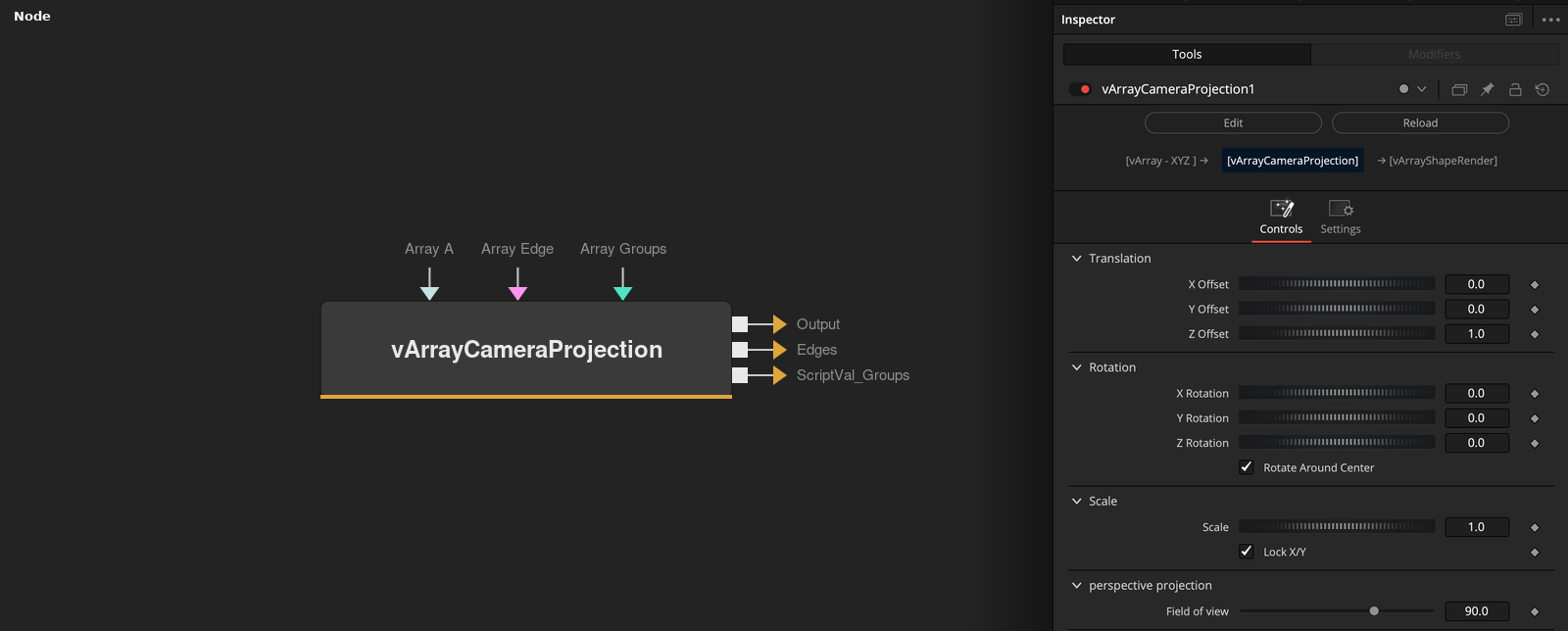
vArrayCameraProjection takes a 3D vArray point table and projects it to screen-space XY coordinates using a configurable virtual camera with position, rotation, scale, and field-of-view controls. It is the required intermediate node between any point generator and vArrayShapeRender — no render pipeline is complete without it.
Parameters
| Parameter | Type | Default | Description |
|---|---|---|---|
| X Offset | Float | 0 | Horizontal position of the virtual camera in world space. Pans the projected output left or right. |
| Y Offset | Float | 0 | Vertical position of the virtual camera in world space. Pans the projected output up or down. |
| Z Offset | Float | 1.0 | Camera distance from the point cloud. This is the primary scale control — increase to zoom out, decrease to zoom in. Most impactful parameter for initial framing. |
| X Rotation | Float | 0 | Rotates the camera around the X axis (tilt). Animatable for pitch sweeps through 3D point clouds. |
| Y Rotation | Float | 0 | Rotates the camera around the Y axis (pan). Animate to orbit around a 3D array. |
+6 more parameters
| Parameter | Type | Default | Description |
|---|---|---|---|
| Z Rotation | Float | 0 | Rotates the camera around the Z axis (roll). Spins the entire projected output around the screen centre. |
| Lock X/Y | Checkbox | On | When enabled, X Scale controls both horizontal and vertical scale uniformly. Disable to stretch or squeeze the projected output independently on each axis. |
| X Scale | Float | 1.0 | Uniform scale of the projected output when Lock X/Y is on. Acts as horizontal-only scale when unlocked. |
| Field of view | Float | 90.0 | Camera field of view in degrees. Lower values flatten perspective towards orthographic projection; higher values exaggerate depth foreshortening on 3D arrays. |
| Show Input | Checkbox | On | Reveals the ArrayA input port on the node. Required to receive the 3D point array from upstream generators. |
| Array A | Array | — | Primary 3D point array input. Connect the output of any vArray generator or modifier here. |
Read the full description
vArrayCameraProjection is the perspective engine of the vArray pipeline. Every point generator — vArrayPointsOnCircle, vArrayPointsOnArc, vArrayPointsOnGrid, vArrayCreateMinMax, vArrayFromOBJ — outputs a 3D coordinate table in world space. vArrayShapeRender needs 2D screen-space XY pairs. CameraProjection is the node that does the conversion, applying a full virtual camera transform between the two. Without it, nothing renders correctly.
The camera is defined by three transform groups: Translate (X/Y/Z position), Rotate (X/Y/Z rotation in degrees), and Scale (X, with Lock X/Y maintaining aspect ratio). The Z Translate value is the most critical — it controls camera distance from the point cloud and has the largest effect on the apparent size and spread of the projected output. The Field of View control (default 90°) adjusts perspective distortion: lower values produce a flatter, more orthographic look; higher values produce exaggerated foreshortening on 3D arrays.
Because CameraProjection is parameterised with standard Fusion controls, all transform values are fully animatable. Keyframe the Z Translate to push in on a point cloud, or animate Y Rotation to orbit around a 3D point array — the screen-space coordinates update every frame and flow directly into ShapeRender. The Lock X/Y checkbox constrains X and Y scale together when scaling; the X Scale parameter acts as a uniform scale when locked. For flat 2D layouts (circle, arc, grid) with no 3D depth, leave the default transform values and just adjust Z Translate to fit the output to frame.
Example Connections
- Standard 3-node pipeline
- With upstream displacement
- OBJ mesh point cloud
vArrayPointsOnCircle.Output -> vArrayCameraProjection.ArrayA
vArrayCameraProjection.Output -> vArrayShapeRender.ArrayPoint
Background.Output -> vArrayShapeRender.Input
vArrayPointsOnGrid.Output -> vArrayDisplaceValues.ArrayA
vArrayDisplaceValues.Output -> vArrayCameraProjection.ArrayA
vArrayCameraProjection.Output -> vArrayShapeRender.ArrayPoint
Background.Output -> vArrayShapeRender.Input
vArrayFromOBJ.Points -> vArrayCameraProjection.ArrayA
vArrayFromOBJ.Edges -> vArrayShapeRender.ArrayEdge
vArrayCameraProjection.Output -> vArrayShapeRender.ArrayPoint
Background.Output -> vArrayShapeRender.Input