vArrayPointsOnGrid
Generate a rectangular grid of evenly spaced points — the standard starting node for matrix layouts, dot patterns, and scatter workflows.
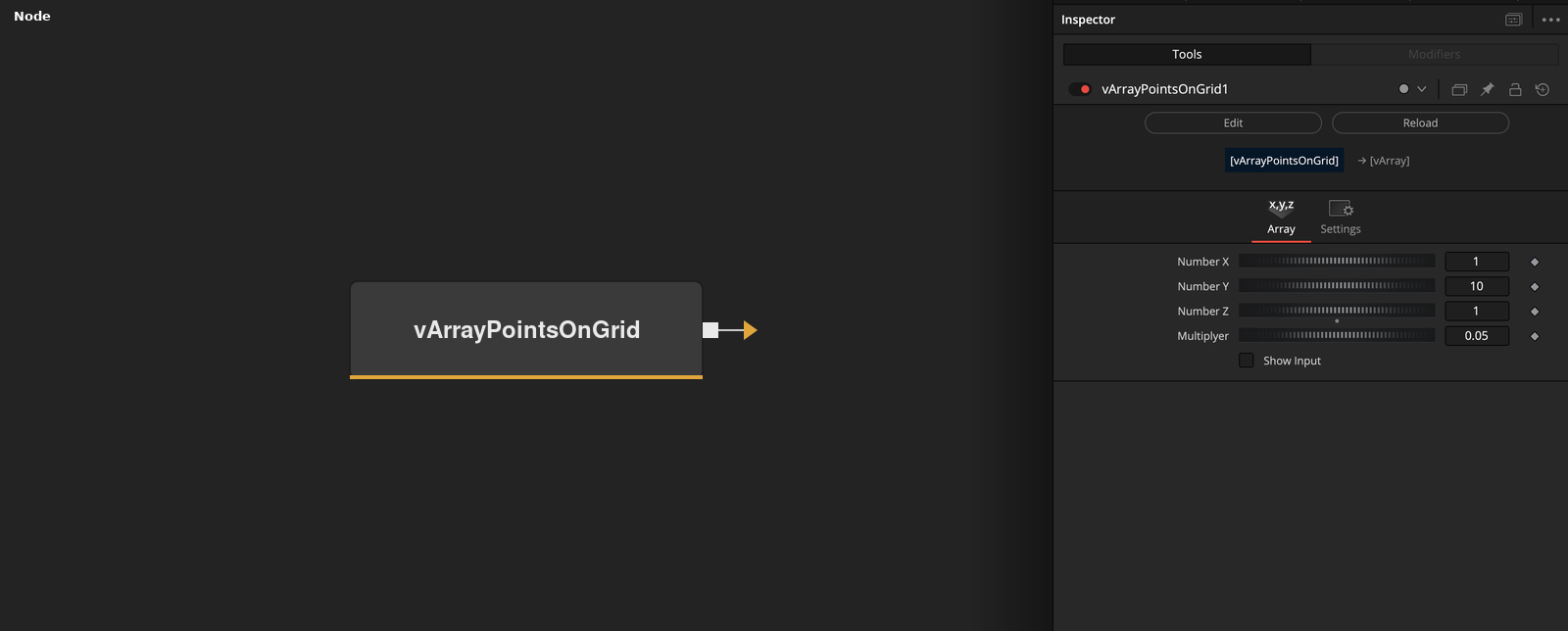
vArrayPointsOnGrid generates a 2D rectangular grid of points defined by column and row counts, with a uniform spacing multiplier. It is the default choice when you need an ordered matrix of positions — feeding directly into vArrayCameraProjection and vArrayShapeRender for immediate output, or into modifiers like vArrayDisplaceValues to break up the regularity.
Parameters
| Parameter | Type | Default | Description |
|---|---|---|---|
| Number X | Integer | 1 | Number of columns in the grid. Total point count equals Number X × Number Y. |
| Number Y | Integer | 1 | Number of rows in the grid. Total point count equals Number X × Number Y. |
| Multiplyer | Float | 0.05 | Uniform spacing scale between points. Increase to spread the grid out; decrease to compress it toward the origin. Note: labelled 'Multiplyer' in the UI (known typo in the fuse). |
| Show Input | Checkbox | Off | Reveals the ArrayA input port, allowing an upstream point array to be passed through or merged with the generated grid. |
Read the full description
vArrayPointsOnGrid is the fundamental grid generator in the vArray toolkit. It produces a 2D rectangular array of evenly spaced points defined by two parameters: the number of columns (Number X) and the number of rows (Number Y). The total point count is always X × Y, and the points are distributed symmetrically around the origin. For matrix layouts, dot-grid backgrounds, scatter starting states, and any composition that needs an ordered rectangular arrangement of positions, this is the right starting node.
The Multiplyer parameter — a known typo in the fuse — controls the uniform spacing between points. It scales both horizontal and vertical spacing together, so the grid always remains square-celled regardless of the value. Increasing it spreads points further apart; decreasing it compresses the grid toward the centre. Because there is no separate X and Y spacing control, non-square cell spacing requires a downstream vArrayMath or vArrayDisplaceValues modifier to stretch one axis independently.
In the standard pipeline the node connects directly to vArrayCameraProjection, which projects the grid to screen space before vArrayShapeRender draws shapes at each position. For organic variations, insert vArrayDisplaceValues between the grid and the camera — even a small Amplitude value breaks up the regularity into a convincing scatter. The Show Input toggle exposes an ArrayA passthrough port, useful for merging multiple grid arrays or chaining grids of different densities in a single pipeline.
Example Connections
- Standard grid pipeline
- Grid with scatter displacement
- Two grids merged
vArrayPointsOnGrid.Output -> vArrayCameraProjection.ArrayA
vArrayCameraProjection.Output -> vArrayShapeRender.ArrayPoint
Background.Output -> vArrayShapeRender.Input
vArrayPointsOnGrid.Output -> vArrayDisplaceValues.ArrayA
vArrayDisplaceValues.Output -> vArrayCameraProjection.ArrayA
vArrayCameraProjection.Output -> vArrayShapeRender.ArrayPoint
Background.Output -> vArrayShapeRender.Input
vArrayPointsOnGrid_A.Output -> vArrayPointsOnGrid_B.ArrayA
vArrayPointsOnGrid_B.Output -> vArrayCameraProjection.ArrayA
vArrayCameraProjection.Output -> vArrayShapeRender.ArrayPoint
Background.Output -> vArrayShapeRender.Input