vArrayCreate
Generate a flat numeric array in four modes — constant fill, 0-1 normalised, 1-2-3 integer sequence, or Min/Max range — the Swiss Army knife seed node.
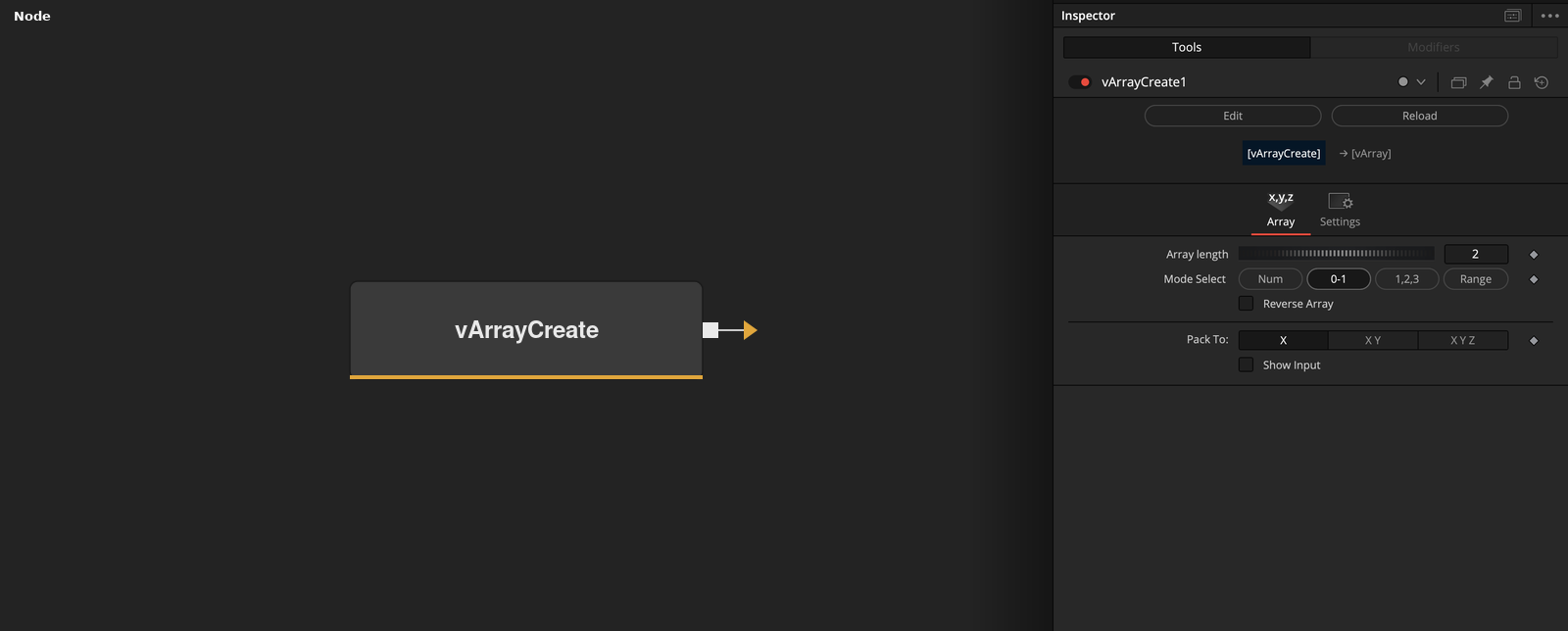
vArrayCreate generates a flat numeric array of any length using one of four fill modes: a constant value, a normalised 0–1 sequence, an ascending integer sequence, or a defined Min/Max range. Use it wherever you need a simple numeric array as pipeline input and vArrayCreateMinMax or vArrayPointsOnGrid would be overkill.
Parameters
| Parameter | Type | Default | Description |
|---|---|---|---|
| Array length | Integer | 2 | Number of elements in the generated array. Minimum 2. All fill modes distribute their values across this length. |
| Mode Select | Dropdown | 0-1 | Selects the array fill mode. Num: fills every element with the constant value set by Number. 0-1: linearly distributed sequence from 0 to 1. 1,2,3: ascending integer sequence starting at 1. Range: linearly distributed values between a Min and Max. Each mode shows only the controls relevant to it. |
| Number | Float | 0 | Constant fill value used in Num mode. Every element in the output array is set to this value. Hidden in all other modes. |
| Reverse Array | Checkbox | Off | Flips the order of the output array. Useful when a downstream node expects descending values or when mirroring a sequence animation. |
| Pack To | Dropdown | X | Output packing format: X (1D flat sequence), X Y (pairs), or X Y Z (triples). Match this to what the downstream node expects. |
+1 more parameters
| Parameter | Type | Default | Description |
|---|---|---|---|
| Show Input | Checkbox | Off | Reveals the ArrayA input port, allowing an upstream array to be passed through or merged with the generated output. |
Read the full description
vArrayCreate is the general-purpose array generator in the vArray toolkit. Where vArrayCreateMinMax is optimised for spatial Min/Max pairs and vArrayPointsOnGrid produces structured 2D layouts, vArrayCreate simply fills an array of a given length with numeric values according to one of four selectable modes. It is the right node when you need raw numbers rather than geometric positions — driving parameter offsets, feeding arithmetic modifiers, seeding randomisers, or providing a simple index sequence to downstream logic nodes.
Mode Select is the key control, presented as a four-button switcher: Num fills every element with the same constant value (set by the Number parameter); 0-1 generates a linearly spaced sequence from 0 to 1 across the array length; 1,2,3 generates an ascending integer sequence starting at 1; Range exposes Min/Max range controls and distributes values linearly between them. Each mode hides the controls irrelevant to it, keeping the UI clean. Pack To structures the output as X-only, XY pairs, or XYZ triples to match downstream expectations.
Reverse Array flips the order of the output — useful when a downstream node expects descending values or when you want to mirror an animation without changing the source data. The Show Input checkbox exposes an ArrayA passthrough port for chaining or merging. In practice, vArrayCreate is most useful early in a pipeline where you need a numeric sequence to drive vArrayMath operations, stagger timing via vArrayStagger, or provide index data to conditional logic nodes.
Example Connections
- Drive a modifier with an index sequence
- Seed a buffer with constant values
- Merge two sequences
vArrayCreate.Output -> vArrayMapRange.ArrayA
vArrayMapRange.Output -> vArrayCameraProjection.ArrayA
vArrayCameraProjection.Output -> vArrayShapeRender.ArrayPoint
Background.Output -> vArrayShapeRender.Input
vArrayCreate.Output -> vArrayBuffer.ArrayA
vArrayBuffer.Output -> vArrayCameraProjection.ArrayA
vArrayCameraProjection.Output -> vArrayShapeRender.ArrayPoint
Background.Output -> vArrayShapeRender.Input
vArrayCreate_A.Output -> vArrayCreate_B.ArrayA
vArrayCreate_B.Output -> vArrayCameraProjection.ArrayA
vArrayCameraProjection.Output -> vArrayShapeRender.ArrayPoint
Background.Output -> vArrayShapeRender.Input