vArrayPointsOnSphere
Distribute points evenly across a sphere — Fibonacci, random, or trimmed to a hemisphere for 3D scatter and globe visualisations.
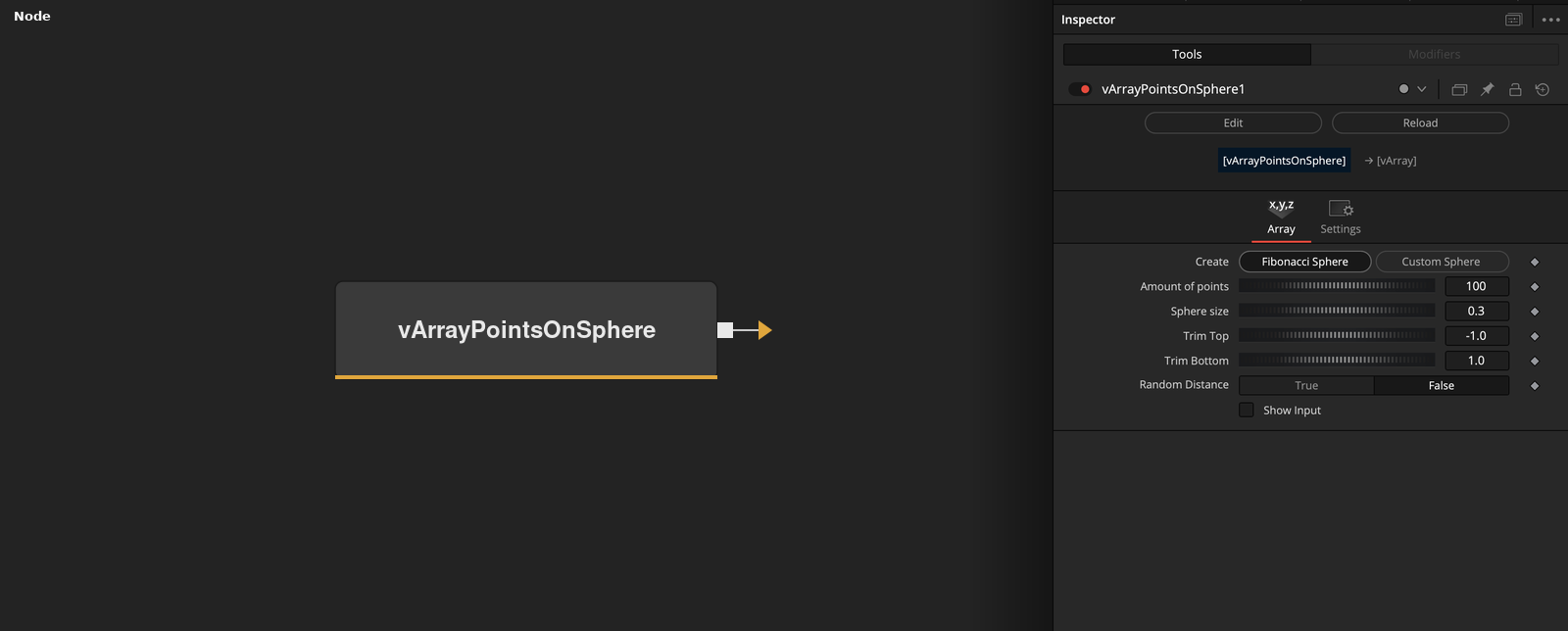
vArrayPointsOnSphere generates a vArray of XYZ coordinates distributed across the surface of a sphere. Choose from multiple distribution algorithms and trim the poles to create hemispheres or bands.
Parameters
| Parameter | Type | Default | Description |
|---|---|---|---|
| Create | Integer | 0 | Internal creation mode flag. Controls whether the node regenerates the array on each parameter change. |
| Amount of points | Integer | 100 | Total number of points to distribute on the sphere surface. Higher values produce denser coverage. |
| Sphere size | Integer | 0.3 | Radius of the sphere in Fusion's normalised coordinate space. Default 0.3 roughly fills a standard 1920×1080 frame when centred. |
| Random distance | Integer | 0 | Toggles radial jitter mode. When enabled, points are offset from the surface by a random amount controlled by Random Distance. |
| Random seed | Integer | 0 | Seed value for the random number generator. Change to get different random layouts while keeping the same point count. |
+5 more parameters
| Parameter | Type | Default | Description |
|---|---|---|---|
| Distribution | Integer | 0 | Selects the point distribution algorithm: Fibonacci spiral (even coverage) or random placement. |
| Trim Top | Integer | -1 | Upper latitude clipping value (–1 to 1). –1 = no trimming at the top pole. Increase to cut off the upper cap. |
| Trim Bottom | Integer | 1 | Lower latitude clipping value (–1 to 1). 1 = no trimming at the bottom pole. Decrease to cut off the lower cap. |
| Random Distance | Integer | 1.0 | Magnitude of the radial offset when Random distance mode is active. Scales how far points are pushed away from the sphere surface. |
| Show Input | Checkbox | 0 | Reveals optional input ports on the node in the Fusion node graph. |
Read the full description
vArrayPointsOnSphere is the primary 3D scatter generator in the vArray toolkit. It computes point positions on the surface of a sphere using a selectable distribution method — Fibonacci spiral for even spacing, or random for organic variation — then outputs a vArray ready for vArrayCameraProjection and vArrayShapeRender.
The Distribution dropdown controls how points are placed on the surface. Fibonacci spiral distribution produces the most visually even coverage and is the preferred mode for data visualisations such as globe plots. Random distribution with a fixed seed gives repeatable organic layouts. Adjust Random distance to add radial jitter, pushing points off the surface for volumetric effects.
Trim Top and Trim Bottom clip the sphere along the Y axis, producing hemispheres, rings, or bands between any two latitude values (–1 to 1). This is particularly useful when the camera angle only sees part of the sphere, or when creating planet visualisations where the poles need to be hidden. Connect the output to vArrayDisplaceValues before rendering to add noise-driven surface variation.
Amount of points scales from 2 to tens of thousands — keep it under 2000 for real-time feedback in Fusion's viewer. Sphere size sets the radius in Fusion's normalised coordinate space (default 0.3 ≈ roughly fills a 1920×1080 frame when centred).
Example Connections
- Standard 3D scatter pipeline
- With noise displacement
vArrayPointsOnSphere.Output -> vArrayCameraProjection.ArrayA
vArrayCameraProjection.Output -> vArrayShapeRender.ArrayPoint
Background.Output -> vArrayShapeRender.Input
vArrayPointsOnSphere.Output -> vArrayDisplaceValues.ArrayA
vArrayDisplaceValues.Output -> vArrayCameraProjection.ArrayA
vArrayCameraProjection.Output -> vArrayShapeRender.ArrayPoint